We use cookies for this site to work properly. Due to EU legislation we have to ask for your consent.
By using our site you accept the terms of our Privacy Policy.
The number of electronic devices gathers corresponding and numerous remote controls. What would you say if you could replace 4 remote controls with one?
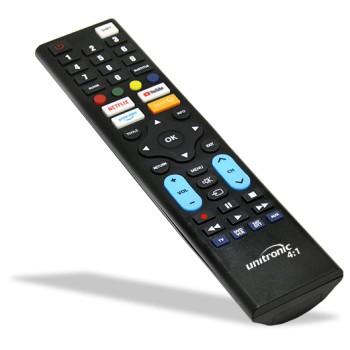
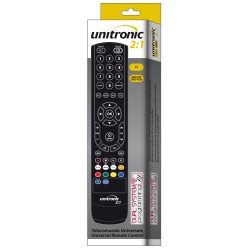
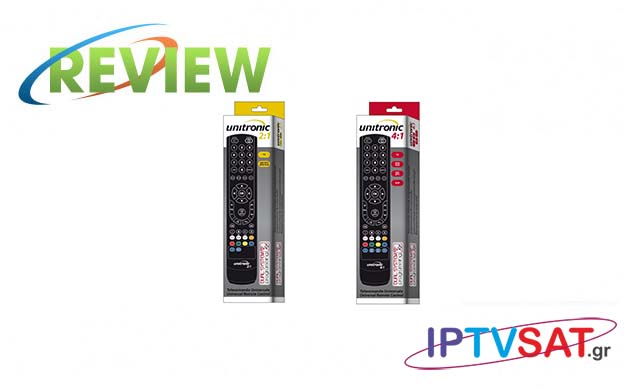
With the new programmable remote controls Unitronic 3096 - MADEFORYOU 2: 1 and Unitronic 3097 - MADEFORYOU 4: 1, you can replace any function of 2 & 4 remote control (TV, SAT, Pay TV, DTT, DVD, VCR, HI FI, PS2, Xbox ), as well as all the basic functions of Smart TV.
We tried the Unitronic 3097 for 4 devices and we describe to you how to program it.
External description
These remote controls are highly ergonomic, as they have all the necessary keys to program more devices and even in the right position.
At the top we find the SOURCE and POWER keys, in the center - among other things - we have the TOOLS, RETURN, MENU and EXIT keys, while the SMART key follows.
We also find the NETFLIX, YOUTUBE, PRIME VIDEO keys, the classic 4 color key and finally we have the 4 TV keys, DVD / VCR, SAT / DTT and AUX to which we assign the devices we want during the programming process. On the right side, we find the 3.5mm socket for the corresponding programming cable, as we will see below.
Programming
The classic way of programming requires the use of a specific IR programmer, which recognizes the remote control and transmits the codes of up to 4 devices via infrared with close contact.
IR Programmer
Clearly, the receiver has a dual status, as a satellite receiver and as an iptv / media player, while several menus are presented more than once in various options, resulting in a relative confusion, however it is overcome shortly after a short menu navigation.
You can download the corresponding software on the GBS Elettronica site or directly at http://www.gbs-elettronica.it/rem/push/3/Setup.exe.
Connect the programmer to a free USB port. After installing the software, run the program and update the directory to update the list of codes and start finding codes in the program.
Place the remote control right in front of the programmer and press the right / left arrow keys at the same time to identify the remote control with Identify.
Note that you may need to do some micromovements on the remote control in relation to the programmer to activate the Signal Strength indicator. Then click on the tab TV, enter the TV brand and with enter all the models will "go down" in the list on the right. Select the model you want and by double-clicking you will see the code appear in green in the corresponding field just above. Respectively, do the same for the other devices by clicking on the VCR / DVD, SAT, AUX tabs until you see 2 or 4 codes (depending on the model 2: 1 or 4: 1). Please note that the titles in the tabs correspond to the 4 keys on the remote control, however it is not mandatory to assign the devices to the corresponding keys. For example, you can put a satellite receiver on the VCR / DVD key, it just fits better if there is a real match. Also, if you can't find exactly the model of device you have, try a similar one and it will most likely work normally.
The programming process starts again with simultaneous pressing of the right-left keys, where the Signal Strength Progress bars will be filled and the message Programming Completed will appear. Are you ready! In the video below, you can see the process as we did during the tests!
Programming via 3.5mm Jack audio cable
With the second way of programming, we exclude any incompatibility with the operating system used (Windows, Osx, Linux), as these are audio signals regardless of operating system.
Visit the following website http://www.madeforyouweb.it/unitronic
Select the 2: 1 or 4: 1 remote control model
Enter the brand and model.
Select the position you want to program. In this step you can - if desired - add additional devices
Insert two AAA batteries into the remote control.
Connect one end of the 3.5 mm audio cable to the remote control and the other end of the cable to the audio port of the device or computer.
Increase the volume of the device or computer to the maximum.
Press the left and right keys of the remote control at the same time, so that the LED starts flashing.
Then press the program key.
In the following official video, you can see the process using a tablet.
Tests
We did tests in both ways, the final choice depends on you. If you do not have a programmer, then you can choose the method with a 3.5 mm mini jack cable, which you will most likely already have.
We have successfully programmed 4 devices,specifically a Samsung 46 '' TV, a Strong digital terrestrial receiver and two Xtrend and Vu + satellite receivers with complete success. Repeat that in the case of programming using an IR programmer, you need to pay more attention to the placement of the remote control opposite the programmer, during which you may need to slightly rotate the remote control by about 20 degrees. Also, with the simultaneous pressing of the right-left keys, in our case the LED of the remote control flashed for a short time and remained on for a few seconds.
Our opinion
Clearly a programmable madeforyou-unitronic remote control for 2 or even better for 4 devices, it facilitates our daily device remote control, as long as one deals with the corresponding programming for a while. Recommended!
I want to buy Unitronic 4:1 with Netflix, Youtube, Prime video buttons.
Please tell how much does it cost, payment methods, delivering methods?
How much programmator costs for it?Looking forward hearing from you!

-250x250.jpg)
-250x250.jpg)




-55x55.jpg)


.jpg)
.jpg)
.jpg)
.jpg)
.jpg)
.jpg)