
-250x250.jpg)




-250x250.jpg)




Marmitek MegaView 76 - HDMI extender and KVM


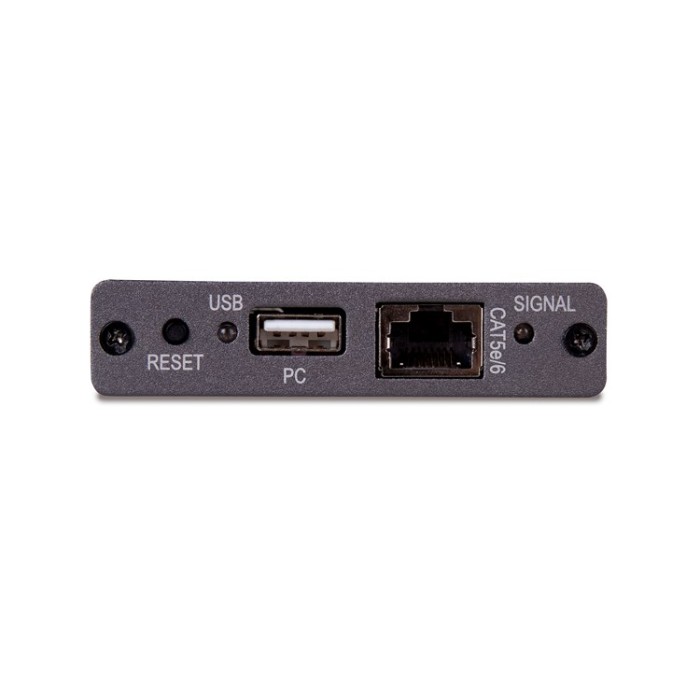


Marmitek MegaView 76
HDMI extender|over 1 CAT 5e/6 cable|KVM|PoC|Full HD|60 m
The Marmitek MegaView 76 provides a simple way to extend an HDMI or DVI signal over a single networking cable. Extend your HDMI cable up to 60 metres over a single networking cable! Supports 1080p Full HD and 3D resolutions, without compression! Watch TV programmes, films and photos or share presentations stored on your PC in HD quality on a 2nd TV/projector elsewhere in the home.
All Marmitek products are designed and manufactured to the highest quality requirements.
Feautures of hdmi extender, KVM
- Watch TV programmes, films and photos or show presentations from your PC in HD quality on a 2nd TV/projector anywhere in home.
- The transmitter has a built-in splitter, enabling you to keep using your existing TV/monitor.
- Extend your HDMI cable up to 60 metres over a single CAT5e/CAT6 cable.
- Connect your keyboard and mouse to the receiver to control your PC remotely (KVM).
- Supports 1080p Full HD and 3D resolutions, without compression.
- Built-in Power over Cable (PoC) technology eliminates the need for a power socket for the Megaview receiver near the TV.
- Use of CAT5e/CAT6 cabling results in optimum price/quality ratio.
- Supports HDCP and is fully compatible with all HDMI versions.
How it works?

First switch off all your devices (TV and HDMI sources) before connecting them to the MegaView 76. If a device cannot be turned off, please remove its plug from the wall socket. Connect the PC to the transmitter, using an HDMI cable. If desired, also connect a (first) TV or monitor to the transmitter, using an HDMI cable. Connect the receiver to your (second) TV or projector, using an HDMI cable. Use one CAT5e/6 networking cable to connect the transmitter and receiver. Connect the power cable to the transmitter's "5V DC" connector and plug the adapter into a wall socket. Connect your PC or laptop to the transmitter, using the supplied USB cable. Connect your mouse and/or keyboard to the receiver.
Features
Video
Video resolution: Max. 1080p@60Hz
HDMI standard: HDMI 1.3, EDID, DVI, all 3D formats
HDCP standards: HDCP 1.4
Colour formats: RGB 4:4:4 and YCbCr 4:2:2
Colour depth: Max. 30-bit
Data transfer: Without compression
Video bandwidth: 10.2 Gbps
Clock frequency: 340MHz
Audio
Audio formats: PCM stereo
Trasmitter
AV input: 1 x HDMI input
UTP/CATx connection: RJ45, EIA/TIA T568B
USB connection: 1 x USB-A (PC, laptop)
Receiver
AV output: 1 x HDMI output
UTP/CATx connection: RJ45, EIA/TIA T568B
USB connection: 2 x USB-A (mouse, keyboard)
Cable length
CAT5/5e cable: Max. 50m@1080p
CAT6 cable: Max. 60m@1080p
HDMI cable: Max. 10 metres
General
Power supply: 5 VDC / 2A
Power supply technology: Power over cable (POC)
The set contents
1x transmitter (HD Transmitter)
1x receiver (HD Receiver)
1x USB to USB cable
1x Power adaptor
1x User Manual


Marmitek MegaView 60 - HDMI extender
Marmitek MegaView 60HDMI extender over CAT5 The Marmitek MegaView 60/61 enables you to easily extend an HDMI (High Definition Multimedia Interface) signal or DVI (Digital Visual Interface) over two CAT5e/6 cables. Maximum CAT5e/6 cable length is..

Marmitek MegaView 65 - HDMI extender
Marmitek MegaView 65HDMI extender over single CAT5 The Marmitek MegaView 65/66 enables you to easily extend an HDMI (High Definition Multimedia Interface) signal or DVI (Digital Visual Interface) over one CAT5e/6 cable. The maximum CAT5e/6 cable leng..

Marmitek MegaView 91 - HDMI extender and RC
Marmitek MegaView 91HDMI extender over single CAT5 The Marmitek MegaView 91 enables you to easily extend an HDMI signal or DVI over one CAT5e/6 cable. It even works on your existing home network (LAN) including routers and switchers. The maximum CAT5..

Marmitek MegaView 91 - Extra receiver
Marmitek MegaView 91Extra receiver In Marmitek MegaView 91 you can add up to 250 receivers in the same network and operate all from the same transmitter.Feautures of hdmi extenderWatch TV programmes or films and view photos from, for example, your di..

Marmitek MegaView 90 - HDMI extender
Marmitek MegaView 90HDMI extender over single CAT5 The Marmitek MegaView 90 provides an simple way to extend an HDMI signal or DVI over one CAT5e/6 cables. It even works on your existing home network (LAN) including routers and switchers. The maximum..

Marmitek MegaView 90 - Extra receiver
Marmitek MegaView 90Extra receiver In Marmitek MegaView 90 you can add up to 250 receivers in the same network and operate all from the same transmitter.Feautures of hdmi extenderWatch your HD Content elsewhere on your TV.Watch TV programmes or films..

Marmitek MegaView 141 UHD - HDMI extender and RC
Marmitek MegaView 141 UHDHDMI extender over single CAT5e/6 The Marmitek MegaView 141 UHD provides a simple way to extend an HDMI or DVI signal over a single networking cable. Extend your HDMI cable up to 70 metres over a single networking cable! Enjo..

Marmitek MegaView 63 - HDMI extender
Marmitek MegaView 63HDMI extender | over 1 CAT 5e/6 cable | Full HD | PoC | 40m The Marmitek MegaView 63 provides a simple way to extend an HDMI or DVI signal over a single networking cable. Extend your HDMI cable up to 40 metres over a single networ..