
-250x250.jpg)




-250x250.jpg)



Techly IDATA HDMI-KVM67 - 4K HDMI KVM EXTENDER 70m
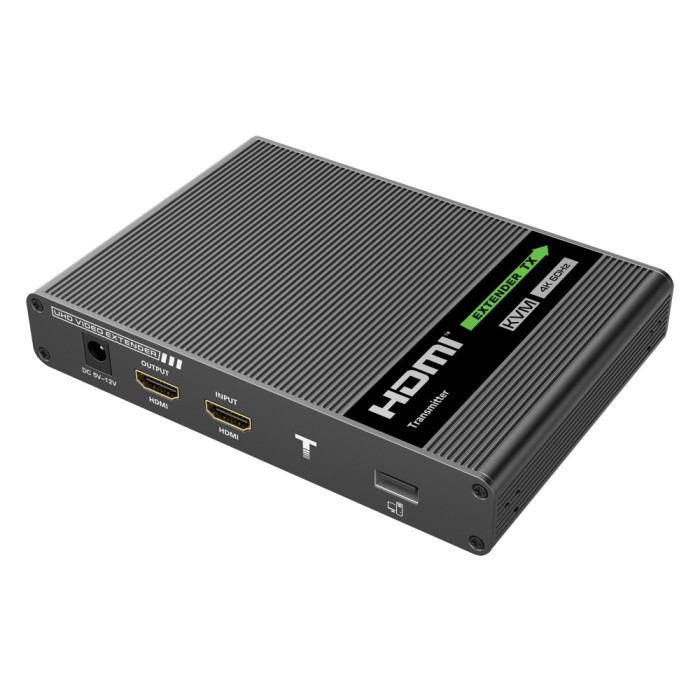
Techly IDATA HDMI-KVM67
4K HDMI KVM EXTENDER 70m OVER CAT6/6A/7
This Techly IDATA HDMI-KVM67 Expansion Device includes a transmitter unit and a receiver unit, allows the transmission of HDMI signal over a distance of up to 70 meters at a resolution of 4K using a category 6 / 6A / 7 network cable. It supports KVM function, allowing you to remotely manage a PC via mouse and keyboard. It is ideal for video broadcasts during conferences, video, education, home entertainment, advertising and signage.
Feautures of hdmi extender, KVM
- HDMI KVM Extender consisting of a local unit (transmitter) and a remote unit (receiver)
- It allows you to extend the HDMI signal up to 70 meters via a single network cable with zero latency
- It supports KVM function, allows you to manage a PC remotely via mouse and keyboard with USB connection
- Supports audio formats (Dolby True HD 7.1CH, Dolby Digital 5.1CH)
- Support resolution up to 4K @ 60Hz, HDR (YUV4: 4: 4), EDID passback
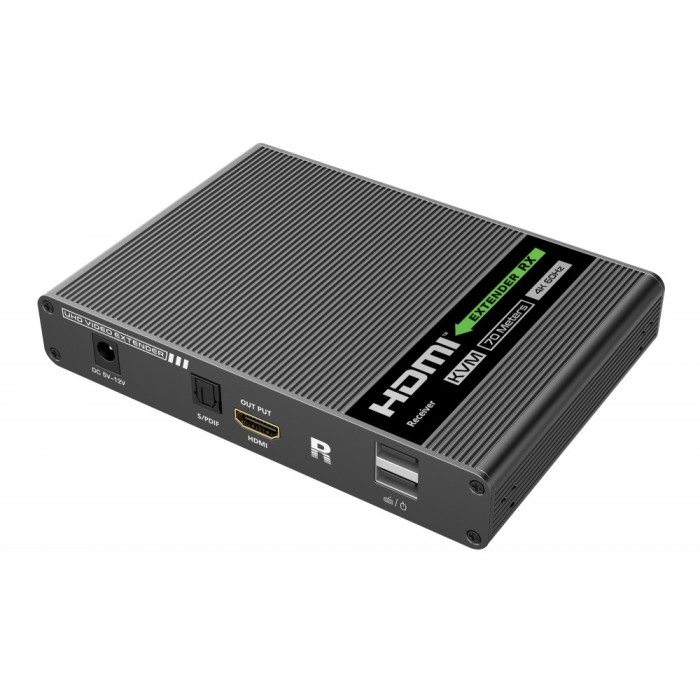
- The receiver can extract digital audio from the transmitter via S / PDIF port
- Support KVM function
- Transmitter is equipped with an HDMI port for local monitor
- With lightning protection, surge protection and ESD protection
How it works?
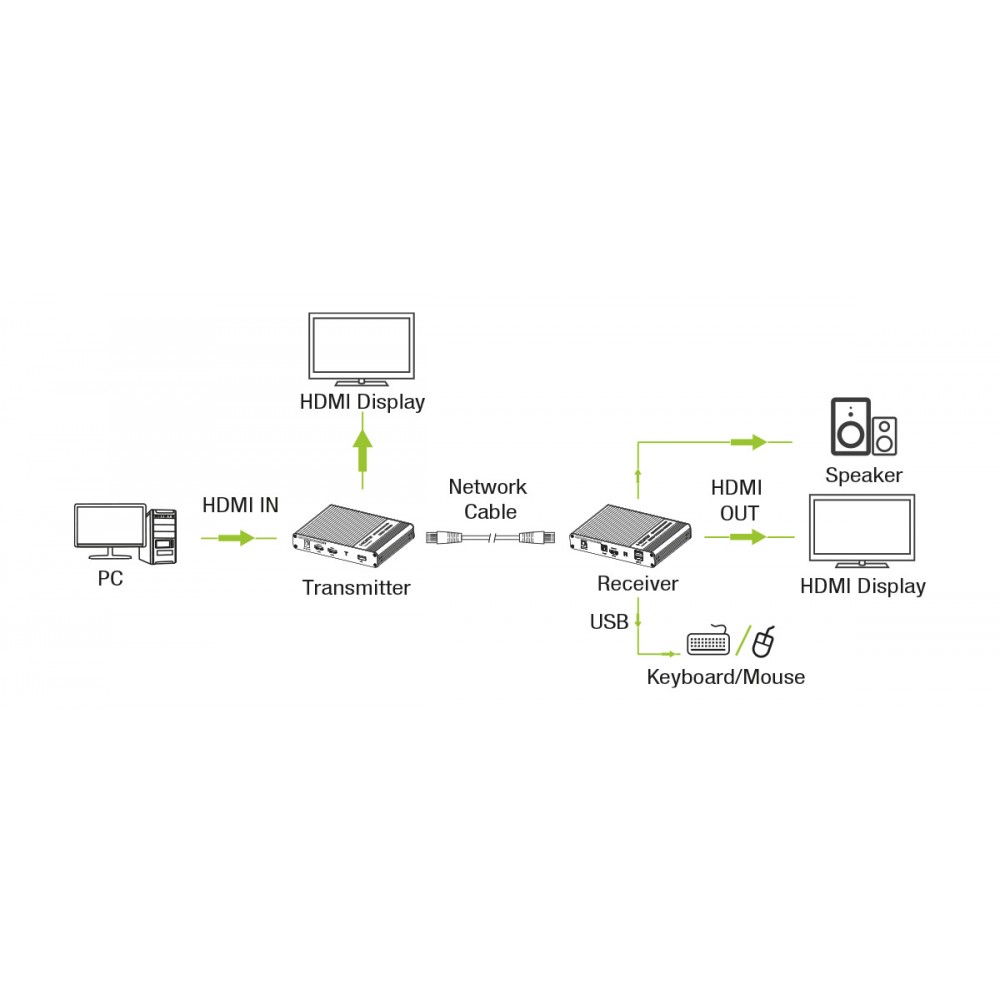
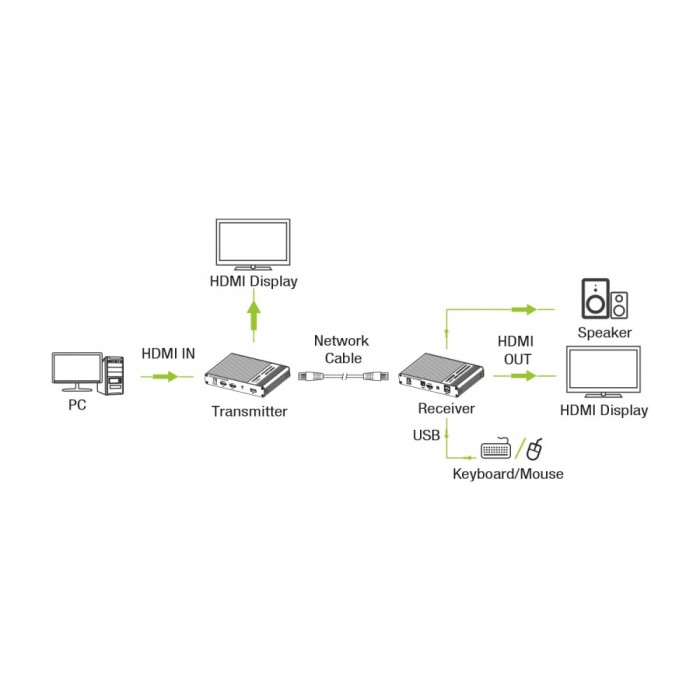
First switch off all your devices (TV and HDMI sources) before connecting them to theTechly IDATA HDMI-KVM67. If a device cannot be turned off, please remove its plug from the wall socket. Connect the PC to the transmitter, using an HDMI cable. If desired, also connect a (first) TV or monitor to the transmitter, using an HDMI cable. Connect the receiver to your (second) TV or projector, using an HDMI cable. Use one CAT6/6a/7 networking cable to connect the transmitter and receiver. Connect the power cable to the transmitter's "5V DC" connector and plug the adapter into a wall socket. Connect your PC or laptop to the transmitter, using the supplied USB cable. Connect your mouse and/or keyboard to the receiver.
Features
Voltage: DC5V-12V
Consumption: <4W for both transmitter and receiver
Supports HDMI 2.0 standard
Supports HDCP 2.2 standard
HDMI Resolutions: 480i @ 60Hz, 480p @ 60Hz, 576i @ 50Hz, 576p @ 50Hz, 720p @ 50 / 60Hz, 1080i @ 50 / 60Hz, 1080p @ 50 / 60Hz, 3840x2160 @ 24/25/30/50 / 60Hz, 4096x2160 @ 24 / 25Hz, 1280x960, 1280x800, 1280x768, 1680x1050, 1360x768, 1366x768, 1600x900, 1024x768, 800x600
Support audio formats: LPCM / DTS-HD / DTS-Audio / Dolby True HD 7.1CH / Dolby Digital 5.1CH
TMDS input and output signal: 0.7 ~ 1.2Vp-p (TMDS)
DDC input and output signal: 5Vp-p (TTL)
Input cable: ≤8m (AWG24)
Output cable: ≤8m (AWG24)
Transmission distance: ≤70m with category 6 / 6A / 7 cable
Dimensions: 150 x 107 x 28.4mm
Black colour
Operating conditions
Operating temperature: -20 to 60 ° C
Storage temperature: -30 to 70 ° C
Humidity: 0 to 90% without condensation
The set contents
1x Transmitter
1x Receiver
2x Power supplies DC5V / 2A
1x USB cable
8x Mounting brackets
18x Screws
1x Instruction Manual



Marmitek MegaView 60 - HDMI extender
Marmitek MegaView 60HDMI extender over CAT5 The Marmitek MegaView 60/61 enables you to easily extend an HDMI (High Definition Multimedia Interface) signal or DVI (Digital Visual Interface) over two CAT5e/6 cables. Maximum CAT5e/6 cable length is..

Marmitek MegaView 65 - HDMI extender
Marmitek MegaView 65HDMI extender over single CAT5 The Marmitek MegaView 65/66 enables you to easily extend an HDMI (High Definition Multimedia Interface) signal or DVI (Digital Visual Interface) over one CAT5e/6 cable. The maximum CAT5e/6 cable leng..

Marmitek MegaView 91 - HDMI extender and RC
Marmitek MegaView 91HDMI extender over single CAT5 The Marmitek MegaView 91 enables you to easily extend an HDMI signal or DVI over one CAT5e/6 cable. It even works on your existing home network (LAN) including routers and switchers. The maximum CAT5..

Marmitek MegaView 91 - Extra receiver
Marmitek MegaView 91Extra receiver In Marmitek MegaView 91 you can add up to 250 receivers in the same network and operate all from the same transmitter.Feautures of hdmi extenderWatch TV programmes or films and view photos from, for example, your di..

Marmitek MegaView 90 - HDMI extender
Marmitek MegaView 90HDMI extender over single CAT5 The Marmitek MegaView 90 provides an simple way to extend an HDMI signal or DVI over one CAT5e/6 cables. It even works on your existing home network (LAN) including routers and switchers. The maximum..

Marmitek MegaView 90 - Extra receiver
Marmitek MegaView 90Extra receiver In Marmitek MegaView 90 you can add up to 250 receivers in the same network and operate all from the same transmitter.Feautures of hdmi extenderWatch your HD Content elsewhere on your TV.Watch TV programmes or films..

Marmitek MegaView 141 UHD - HDMI extender and RC
Marmitek MegaView 141 UHDHDMI extender over single CAT5e/6 The Marmitek MegaView 141 UHD provides a simple way to extend an HDMI or DVI signal over a single networking cable. Extend your HDMI cable up to 70 metres over a single networking cable! Enjo..

Marmitek MegaView 63 - HDMI extender
Marmitek MegaView 63HDMI extender | over 1 CAT 5e/6 cable | Full HD | PoC | 40m The Marmitek MegaView 63 provides a simple way to extend an HDMI or DVI signal over a single networking cable. Extend your HDMI cable up to 40 metres over a single networ..
Techly IDATA HDMI-KVM60 - HDMI AND KVM EXTENDER OVER CAT5
Techly IDATA HDMI-KVM60 HDMI AND KVM EXTENDER OVER CAT5 This Techly IDATA HDMI-KVM60 Expansion Device is the solution for transmitting an uncompressed HDMI 1080p @ 60Hz signal via a Cat5 / 5e / 6 network cable. It includes a pairing transmitter ..