Your shopping cart is empty!

MENU
Your shopping cart is empty!
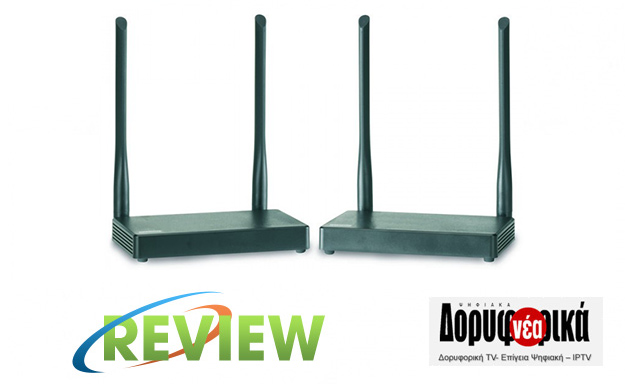
Marmitek made the difference once again, as the wireless HDMI transmission has been made very easy. Right below, we present you the multiple features of the new TV Anywhere Wireless HD!
The new Marmitek product we present you is a sofisticated HD Video Sender, because it gives you the ability to watch TV in FullHD 1080p anywhere in your home without any cabling, with wireless HDMI signal transmission up to 50m wide through walls and ceilings (200m with full visual contact), without loss of quality or noticeable lag.
In addition, through the infrared return function, you can control your remote device with its own remote control, while PC remote control is also possible because you can connect the keyboard and the mouse.
TV Anywhere Wireless HD consists a transmitter (TX) and a receiver (RX), dimensions 140 x 84 x 22 mm and weight just 176gr. The two units have 2 moving antennas for optimal range, which - as a result of our testing - is one of the most powerful we've ever tried on wireless devices. In terms of connections, the transmitter has HDMI IN, HDMI OUT for not losing the standard TV, Micro USB to connect to PC, IR IN jack, input for the supplied power supply and general power switch.
The receiver has HDMI OUT, 2 USB A keyboard and mouse ports, IR IN Jack, the input for the supplied power supply and a general power switch.
Each unit also has 3 LEDs for Wireless, Link (fixed orange) and Input / Output (blue). If the HDMI source is not compatible, the blue may flash or remain red, while in the case of a poor link or an HDMI resolution error, the orange will blink.
The connection of the two units does not need a particular explanation and note that in the transmitter, you can (and should) through the HDMI out to connect your main TV. Also, near the transmitter you need to place the IR sensor properly on your supervised device in order to allow remote control via IR return, while on the receiver the sensor just need s to "see" your remote. In the package, you will find - among other things - 2 HDMI cables, which you should use from the start, for every case of cable incompatibility.
During the test, we placed the two units at the maximum distance we could in our space (both at the ends of the building), which includes walls. Range performance was more than exemplary, as we did not have the slightest problem with wireless connection, something that did not apply to other wireless devices with the same placement. Make sure your source resolution is 1080p @ 50 / 60Hz, 1080i, 720p, 576p or 480p at least. The system does not require any adjustment and after a few seconds an image will appear on your TV with excellent quality, depending on the signal of the HDMI source you will use.
When a computer is connected to the transmitter, you can control remotely. To use this computer, connect a keyboard and a mouse into the receiver and by using your 2nd TV you can work on your computer or on a laptop located elsewhere in the house. There are 2 USB A ports on the receiver, and a micro USB port is available on the transmitter to connect to the computer.
TV Anywhere Wireless HD also allowds you to watch an HDMI source on a smartphone / tablet by using the TV Anywhere (iOS and Android) companion application. For this function, you need only the transmitter of the device while the receiver can remain closed. On your smartphone / tablet you will find a new wireless network with SSID »TX ****** TX» to which you will need to log in with the code 12345678, and it is obvious that the internet connection on your smartphone / tablet will become inactive. When you log in to the new Access Point, in a few seconds you an image will appear without any further adjustment. Clearly, this is a nice and useful application, as you can enjoy a movie on your tablet in the bedroom, while your main decoder is in the living room. TV Anywhere application also contains an extra feauture, where the image can be split in 2 parts, allowing you to watch your own content through your transmitter and smartphone using VR (Virtual Reality) glasses for an even richer experience.
Marmitek has given us another great product with a triple application, since apart from your second TV, you can watch on a smartphone / tablet and use your computer remotely!
Source: Digital Satellite News
Author: Periklis Pantoleon
-250x250.jpg)

-250x250.jpg)






-55x55.jpg)