Your shopping cart is empty!

MENU
Your shopping cart is empty!
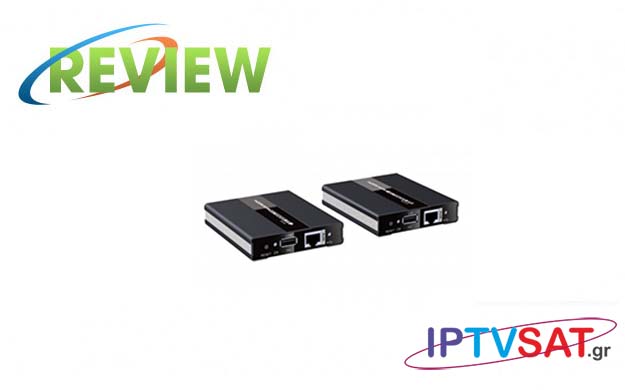
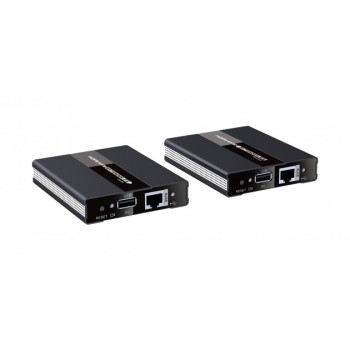
We test the TECHLY IDATA HDMI-KVM60, which is a HDMI / KVM extender via network cable at a distance up to 60 meters.
This particular HDMI / KVM Extender is a solution for transmitting and expanding an uncompressed signal up to 1080p @ 60Hz HDMi via a Cat5 / 5e / 6 network cable. The set includes a transmitter unit (TX) and a receiver unit (RX). which act as a pair. The transmission distance reaches 60 meters on a Cat6 cable with almost zero lag, while the KVM Extender can remotely control the device from the receiver side with a keyboard and mouse.
Both devices have HDMI 1.3 ports with HDCP 1.4 and support a maximum bitrate of 10.2 Gbps.
The original KVM comes from the words Keyboard, Video, Monitor, while the KVM extenders are mainly intended to increase the distance between the main computer and the keyboard / mouse with which the test is performed.
These devices are a convenient way to transmit video over long distances, such as 60 meters with Techly's product, while via USB ports, we connect both the keyboard and the mouse, maintaining full control of a computer.
Also note that the PS / 2 and USB keyboard and mouse protocols are designed for a distance of about 5-8 meters, while the quality of digital video via HDMI is significantly degraded by the distance.
The reasons for the need to access a computer remotely vary depending on the application, however some of them are:
.jpg)
The two devices in the set have dimensions of 95 x 78 x 18.6 mm, while they are housed in a quality boat made of aluminum alloy with sandblasting treatment.
The transmitter (Tx) must be powered by the supplied external 5V power supply. On one side with the 5V input, the Tx has HDMI IN, HDMI OUT, while on the other side we have a reset button for restart, USB port for connecting to the computer with the provided cable, RJ45 port, an indicative green LED Video Video link and a blue LED to indicate KVM connection (keyboard / mouse) via USB.
The receiver (Rx) does not require an external power supply, as it is covered via the Ethernet (PoE) connection. In Rx we have an HDMI out port, 2 USB ports to connect keyboard and mouse, RJ45 port, reset button and the corresponding LEDs that Tx has.
Note that the two Tx and Rx devices connect Point To Point and not via a local area network.
.jpg)
The most common cables that can be used in the case of Techly's HDMI / KVM Extender are Cat 5e and Cat 6, because they are low cost and fully meet transmission standards.
RJ-45 connectors for use at HDMI Extenders should follow the standard T568B for patch cables, which includes the following series of conductors:
Pin1: White / orange
Pin2: Orange
Pin3: White / Green
Pin4: Blue
Pin5: White / Blue
Pin6: Green
Pin7: White / Brown
Pin8: Brown
During the test, we connected the transmitter (Tx) to the HDMI port of a desktop computer, maintaining the main screen via the Tx HDMI out, as well as the USB port respectively, while using a Cat 6 cable, with a total length of 50 meters, controlling both the seamless transfer of image and sound, as well as the ability to transfer control signals from the mouse and keyboard.
On the remote screen, we connected the HDMI out of the Rx and on the 2 USB ports a keyboard and a mouse.
Then we powered the Tx, the LED video link turned green and the LED for USB communication flashed blue. In a short time we had an image and sound from the desktop computer on the remote screen, with full control of keyboard and mouse. On the remote screen, no one understands a latency, as the response to the keyboard and mouse is immediate. To clarify that on the desktop computer, we do not need to remove the keyboard and mouse, just connect our main screen to the HDMI OUT port of the Tx, so the computer remains functional and 100% controlled.
Then we used the Techly IDATA HDMI-KVM60 as a simple HDMI Extender, connecting an HD satellite receiver for remote viewing, with complete success, quality image and sound. In this case, the blue LED for USB communication flashes slowly.
Techly IDATA HDMI-KVM60 is an excellent HDMI / KVM extender, with which we can fully control - with screen, keyboard and mouse - from a distance of up to 60 meters, a computer with full immediacy or just transfer image & sound from some HDMI source via ethernet cable. Worth it!
Source: IPTVSAT.gr
Author: Περικλής Παντολέων
-250x250.jpg)



-250x250.jpg)





-55x55.jpg)