
-250x250.jpg)






-250x250.jpg)




Marmitek MegaView 91 - HDMI & RC over single CAT5/6



Marmitek MegaView 91
HDMI extender over single CAT5
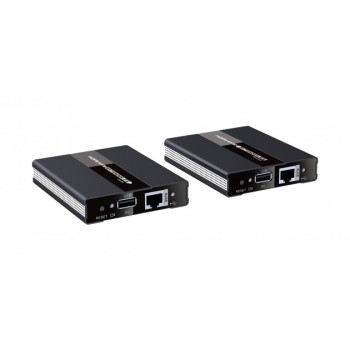
The Marmitek MegaView 91 enables you to easily extend an HDMI signal or DVI over one CAT5e/6 cable. It even works on your existing home network (LAN) including routers and switchers. The maximum CAT5e/6 cable length is 120 metres, at a 1080p resolution. Watch TV programmes, films and photos stored on, for example, a digital TV decoder, Media Center PC, Bluray player or HDD recorder located elsewhere in your home. Several receivers may simultaneously be connected to the same network. The built in loop-through function (HDMI out) on the transmitter allows you to watch the same content on both your primary HDTV and your secondary HDTV or HD projector (through the receiver).
All Marmitek products are manufactured with the utmost precision and are of high quality.
Feautures of hdmi extender
- Watch TV programmes or films and view photos from, for example, your digital TV decoder, Media Centre PC, Blu-ray player or hard disk recorder anywhere in the home on your TV/projection screen, in HD quality.
- The built-in HDMI splitter enables you to connect an HDTV to the transmitter, so you can still watch the connected devices locally
- Extend your HDMI cable up to 100 metres using one CAT5e/CAT6 cable!
- Even works on your existing home network (LAN) including routers and switchers.
- Multiple receivers may simultaneously be connected to the same network.
- Supports up to 1080p Full HD.
- Operate your connected A/V equipment remotely, using the infrared return function.
How it works?

Connect the HDMI source (Blu-ray disc player, TV Decoder, Media Centre PC, etc.) to the MegaView 91 transmitter, using an HDMI cable (not provided). Optional: connect an HDTV to the MegaView 91 transmitter with an HDMI cable to HDMI OUT, to be able to continue to watch TV in this room. Connect the MegaView 91 receiver to the appliance shown (e.g. HDTV or projector), using an HDMI cable (not provided). Use one CAT5e/6 Ethernet cable to connect the MegaView 91’s transmitter to the receiver. The MegaView 91 can either be connected by using a single cable, or through an existing home network (LAN) in combination with network switches and routers. Finaly, connect the power adapter on the ‘DC/5V’ connection on the MegaView 91 and plug the adapter into a socket.
Features
Video
Data transmission: TCP/IP, H.264 compression
Supported HDTV resolutions: 480p, 576i, 576p, 720p, 1080i, 1080p
Maximum Pixel Frequency (max): 225 MHz
Maximum Bit Rate (max): 2.25 Gbps (6,75 Gbps per channel)
Audio
Supported audio formats: PCM stereo
Trasmitter
HDMI input: (19-pin female) 1 HDMI
HDMI output: (19-pin female) 1 HDMI
TX LAN: RJ45, EIA/TIA T568B
Maximum CAT5e cable length: 100m@1080p
Maximum CAT6 cable length: 120m@1080p
Receiver
HDMI output: (19-pin female) 1 HDMI
RX LAN: RJ45, EIA/TIA T568B
IR Receiver (MegaView 91)
Frequency range: 30 - 60 KHz
IR reception range: ± 6 metres
Connection: 3.5mm jack plug
Cable length: 100 cm
Power
Input: 100-240VAC @50-60Hz
Output: 5VDC @ 1A
The set contents
1x transmitter (HDMI Transmitter)
1x receiver (HDMI Receiver)
1x Infrared receiver
1x Infrared blaster LED
2x Power adaptor
1x User Manual


Marmitek MegaView 60 - HDMI extender
Marmitek MegaView 60HDMI extender over CAT5 The Marmitek MegaView 60/61 enables you to easily extend an HDMI (High Definition Multimedia Interface) signal or DVI (Digital Visual Interface) over two CAT5e/6 cables. Maximum CAT5e/6 cable length is..

Marmitek MegaView 66 - HDMI extender and RC
Marmitek MegaView 66HDMI extender over single CAT5 The Marmitek MegaView 65/66 enables you to easily extend an HDMI (High Definition Multimedia Interface) signal or DVI (Digital Visual Interface) over one CAT5e/6 cable. The maximum CAT5e/6 cable leng..

Marmitek MegaView 65 - HDMI extender
Marmitek MegaView 65HDMI extender over single CAT5 The Marmitek MegaView 65/66 enables you to easily extend an HDMI (High Definition Multimedia Interface) signal or DVI (Digital Visual Interface) over one CAT5e/6 cable. The maximum CAT5e/6 cable leng..

Marmitek MegaView 91 - Extra receiver
Marmitek MegaView 91Extra receiver In Marmitek MegaView 91 you can add up to 250 receivers in the same network and operate all from the same transmitter.Feautures of hdmi extenderWatch TV programmes or films and view photos from, for example, your di..

Marmitek MegaView 90 - HDMI extender
Marmitek MegaView 90HDMI extender over single CAT5 The Marmitek MegaView 90 provides an simple way to extend an HDMI signal or DVI over one CAT5e/6 cables. It even works on your existing home network (LAN) including routers and switchers. The maximum..

Marmitek MegaView 90 - Extra receiver
Marmitek MegaView 90Extra receiver In Marmitek MegaView 90 you can add up to 250 receivers in the same network and operate all from the same transmitter.Feautures of hdmi extenderWatch your HD Content elsewhere on your TV.Watch TV programmes or films..

Marmitek MegaView 141 UHD - HDMI extender and RC
Marmitek MegaView 141 UHDHDMI extender over single CAT5e/6 The Marmitek MegaView 141 UHD provides a simple way to extend an HDMI or DVI signal over a single networking cable. Extend your HDMI cable up to 70 metres over a single networking cable! Enjo..

Marmitek MegaView 76 - HDMI extender and KVM
Marmitek MegaView 76 HDMI extender|over 1 CAT 5e/6 cable|KVM|PoC|Full HD|60 m The Marmitek MegaView 76 provides a simple way to extend an HDMI or DVI signal over a single networking cable. Extend your HDMI cable up to 60 metres over a single n..

Marmitek MegaView 63 - HDMI extender
Marmitek MegaView 63HDMI extender | over 1 CAT 5e/6 cable | Full HD | PoC | 40m The Marmitek MegaView 63 provides a simple way to extend an HDMI or DVI signal over a single networking cable. Extend your HDMI cable up to 40 metres over a single networ..
Techly IDATA HDMI-KVM60 - HDMI AND KVM EXTENDER OVER CAT5
Techly IDATA HDMI-KVM60 HDMI AND KVM EXTENDER OVER CAT5 This Techly IDATA HDMI-KVM60 Expansion Device is the solution for transmitting an uncompressed HDMI 1080p @ 60Hz signal via a Cat5 / 5e / 6 network cable. It includes a pairing transmitter ..

Techly IDATA HDMI-KVM2 - HDMI AND KVM EXTENDER OVER CAT5
Techly IDATA HDMI-KVM2 HDMI AND KVM EXTENDER OVER CAT5e / 6 This Techly IDATA HDMI-KVM2 Expansion Device is the solution for transmitting an uncompressed HDMI 1080p @ 60Hz signal via a Cat.5e / 6 network cable. It includes a pairing transmitter ..

Techly IDATA HDMI-KVM67 - 4K HDMI KVM EXTENDER 70m
Techly IDATA HDMI-KVM674K HDMI KVM EXTENDER 70m OVER CAT6/6A/7 This Techly IDATA HDMI-KVM67 Expansion Device includes a transmitter unit and a receiver unit, allows the transmission of HDMI signal over a distance of up to 70 meters at a resolution of..

Techly IDATA HDMI-KVM3 - HDMI KVM Extender 150m
Techly IDATA HDMI-KVM3HDMI KVM Extender 150mThis Techly IDATA HDMI-KVM3 extender includes a transmitter unit and a receiver unit, allows HDMI signal transmission up to 150 meters with 1080p resolution using Cat6 class network cable. It supports KVM m..